WEDOFUTURE/Products/STREAM.SIMULATION
SIM

// PRODUCT 01 / 05

STREAM.SIMULATION

Discrete event simulation platform for warehouse design, capacity validation,and throughput forecasting. De-risk every capital investment with digital twinmodeling before a single piece of equipment is ordered.

Digital TwinCapacity PlanningROI Validation3D Visualization
◈ ◈ ◈
STREAM.SIMULATION — 3D Simulation Engine
10x
Faster Validation
±2%
Forecast Accuracy
500+
Models Delivered

Integrates with

AutoCADSolidWorksMATLABAnyLogistixFlexSimAnyLogicCAD Exchange

// OVERVIEW

Validate Every Design Decision Before You Commit

STREAM.SIMULATION uses high-fidelity discrete event modeling to replicate yourentire warehouse operation — inbound, storage, picking, packing, and outbound —so you can identify bottlenecks, validate throughput targets, and optimizeequipment counts before construction begins.

01
Greenfield Planning
Model a new facility from scratch using your CAD floor plans. Define zonelayouts, equipment specifications, and labor schedules to establish aperformance baseline before breaking ground.
02
Brownfield Expansion
Import your existing warehouse layout and simulate incremental changes —new mezzanine levels, additional picking stations, conveyor extensions —with live data from your current WMS.
03
Digital Twin Live Sync
Connect simulation models to live warehouse data streams for real-timecalibration. Drift detection flags when actual performance divergesfrom the model, enabling proactive corrective action.

// CORE ENGINE

Physics-Accurate Material Flow Modeling

STREAM.SIMULATION's engine models every equipment class withreal-world kinematic constraints — conveyor belt speeds, sorter throughputcurves, AS/RS cycle times, and AMR navigation paths — so your modelbehaves exactly like the real system.
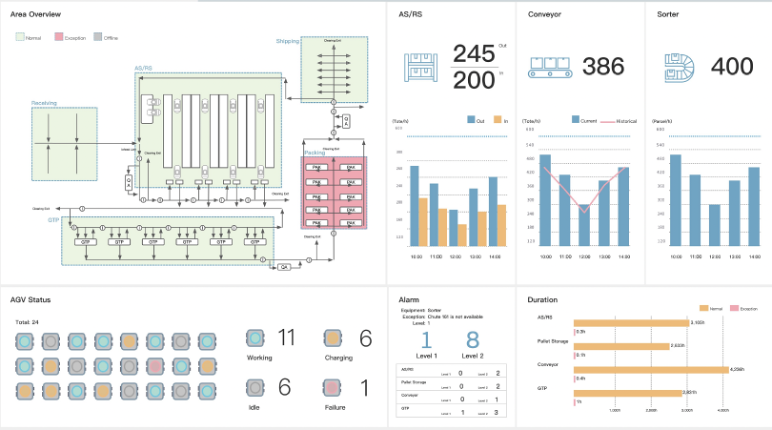
  • Stochastic task arrival modeling with configurable Poisson distributions
  • Equipment failure and MTBF simulation for maintenance planning
  • Multi-floor, multi-zone layouts with stairwell and elevator logic
  • Labor scheduling and ergonomic fatigue analysis
Schedule Technical Walkthrough
Simulation Engine — Material Flow Graph

// REPORTING

Instant Business Case Reports for Stakeholders

Generate executive-ready PDF reports that translate simulation results intobusiness language — total cost of ownership, payback period, throughputimprovement, and risk analysis — in one click.
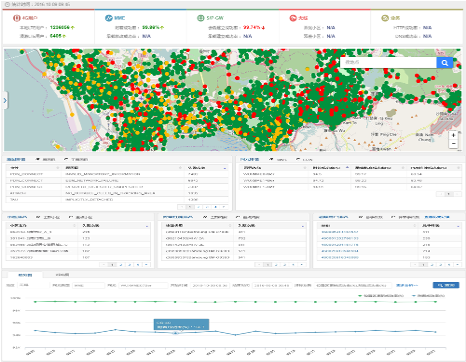
  • Automated bottleneck identification with ranked improvement recommendations
  • Side-by-side scenario comparison (up to 8 scenarios simultaneously)
  • Animated 3D playback of peak-hour operations for stakeholder presentations
  • Sensitivity analysis across labor cost, SKU mix, and order volume variables
Download Sample Report
Report Dashboard — Scenario Comparison
500+
Simulation Models Delivered
±2%
Forecast Accuracy vs. Live
10x
Faster than Physical Prototyping
100%
Capital Risk Reduction

// TECHNICAL SPECIFICATIONS

Platform Specifications

Simulation Capabilities

Model ScaleUp to 1 million entities per model; unlimited zones and floors
Time AccelerationReal-time, 10x, 100x, 1000x, and custom multipliers
RandomnessConfigurable probability distributions: Normal, Poisson, Uniform, Weibull, Triangular
Animation3D isometric and perspective views; animated entity tracking with speed control
Scenario ManagerUp to 8 concurrent scenarios with automated statistical comparison
MTBF / MTTREquipment reliability modeling with configurable repair time distributions

Integration & Data

CAD ImportAutoCAD (.dwg, .dxf), SolidWorks (.sldprt, .sldasm), STEP, IGES, Collada
WMS DataREST API connector; CSV/Excel import of order profiles and SKU master data
Live SyncMQTT and OPC-UA for real-time data streaming from live warehouse systems
ReportingAutomated PDF/HTML reports; direct export to Power BI and Tableau
APIPython SDK and REST API for custom automation and CI/CD integration
DeploymentWindows desktop (standalone), enterprise server (multi-user), cloud instance

// HOW IT WORKS

From Floor Plan to Business Case in Four Steps

STEP 01
Import Floor Plan
Upload your CAD drawings or build layouts directly in the built-in editor. Define zones, dock doors, and storage locations.
STEP 02
Configure Equipment
Select equipment from the library or define custom kinematics. Set throughput curves, failure rates, and maintenance windows.
STEP 03
Run Simulation
Execute single or batch simulations across multiple scenarios. Analyze bottleneck reports and animated playback results.
STEP 04
Generate Business Case
Export executive-ready PDF reports with ROI analysis, payback period, and ranked recommendations for stakeholders.

// GET STARTED

De-risk your next warehouse expansion with a validated design.

Our solutions engineers will build a custom simulation model of yourtarget facility and deliver a throughput validation report within 10 business days.